第7章:MCP と tool exposure 設計
この章で扱うこと
この章では、MCP と tool exposure を「便利な拡張」ではなく、 権限境界、Secrets 境界、外部副作用、監査ログを設計する問題として扱います。
扱う観点は次の通りです。
- read-only / write / external side effect を分けて tool を公開する
- Copilot cloud agent、Copilot CLI、custom agent、repository settings の MCP 設定を整理する
- MCP tool を custom agent の役割や第5章の policy / control surface に接続する
- Secrets、外部 API、mutating tool、rate / cost、audit の review 観点を固定する
- 導入時と変更時の gate を明確にする
tool exposure は authority boundary である
MCP は、エージェントに外部データや操作能力を渡す標準的な接続点です。 しかし、tool を増やすことは能力を増やすだけでなく、権限、費用、情報流出、外部副作用も増やします。
したがって、MCP / tool exposure の設計では、次を最初に決めます。
- エージェントが何を読めるか
- 何を書けるか
- どの外部サービスに接続できるか
- どの secret / token / environment variable を使うか
- tool call の証跡をどこに残すか
- 誤実行時に止める、戻す、通知する手段があるか
「使える tool を全部渡す」方針は、検証用途では速く見えても、商用運用では review と監査の負荷を増やします。 原則は、作業単位ごとの 最小公開 です。
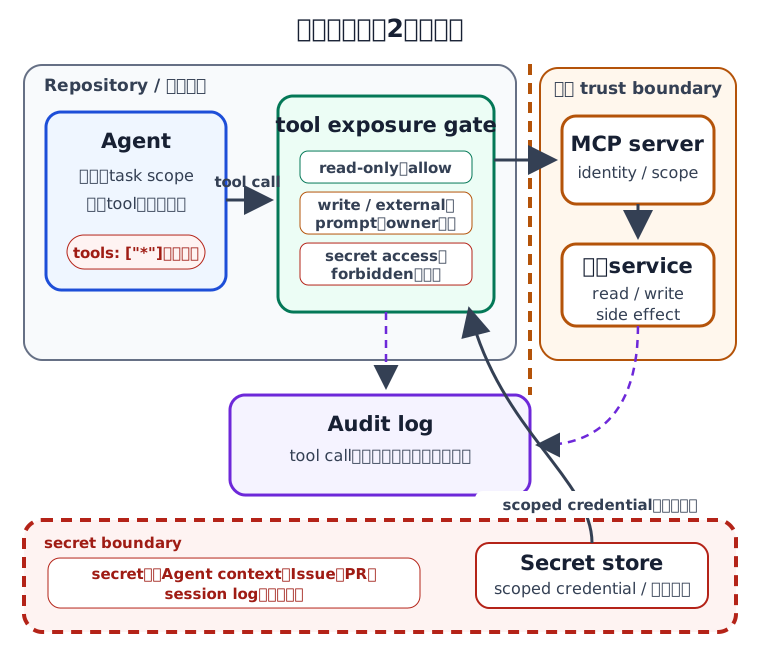
capability 分類
tool は、名前ではなく能力で分類します。 次の表を使い、許可、承認、禁止の基準を決めます。
| capability | 例 | 既定分類 | 必要な gate |
|---|---|---|---|
| read-only | Issue / PR / file / log の取得、検索 | allow | scope 明示、ログ保存 |
| local validation | lint、test、build、リンクチェック | allow | 実行ログ、再現コマンド |
| repo write | branch 作成、commit、PR コメント、label | prompt | repository 権限、PR 証跡 |
| mutating GitHub API | issue close、release 作成、workflow dispatch | prompt | maintainer approval、rollback |
| external read | SaaS、ticket、wiki、registry の参照 | prompt | data boundary、利用目的 |
| external write | ticket 更新、通知送信、デプロイ操作 | prompt / forbidden | owner approval、audit log |
| secret access | token、production secret、customer data | forbidden を既定 | 例外承認、隔離環境、監査 |
read-only でも無制限ではありません。 機微情報を含む private repository、顧客情報、監査ログ、料金情報を読む場合は、prompt 扱いにします。
MCP 設定レイヤー
MCP は実行環境ごとに設定位置と責任者が異なります。 同じ tool でも、cloud agent と CLI では承認モデルが異なるため、分けて設計します。
| レイヤー | 主な設定場所 | 使いどころ | 注意点 |
|---|---|---|---|
| Copilot cloud agent default | GitHub が提供する既定 MCP | Issue / PR など GitHub 文脈の取得 | 既定範囲と token scope は最新 docs を確認する |
| Repository-level MCP | repository settings の MCP configuration | repo 全体で使う外部 tool | Copilot が自律的に使うため、tools を絞る |
| Custom agent MCP | agent profile の mcp-servers |
役割別に tool を限定する | agent ごとの責任境界を PR で review する |
| Copilot CLI MCP | ~/.copilot/mcp-config.json など |
maintainer の手元作業、検証 | 個人環境差分と承認ログが残りにくい |
| Organization / enterprise policy | registry / allowlist / policy | 組織標準の接続先制御 | plan / policy 対象が変わり得る |
Copilot cloud agent では、repository 管理者が MCP server を構成すると、指定した tool が各タスクで利用可能になります。 この場合、エージェントは利用可能な tool を自律的に使うため、保存前に server と tool list を review します。
custom agent と tool exposure
第4章では、custom agent を専門役割の固定として扱いました。 第7章では、その agent にどの tool / MCP を渡すかを設計します。
custom agent profile では、役割、説明、指示に加えて、利用可能な tool や MCP server を絞れる場合があります。 設計上は、次のように役割と tool を対応させます。
| custom agent | 渡してよい tool | 渡さない tool | 理由 |
|---|---|---|---|
| docs-agent | read、search、link check、PR comment | release、deploy、secret read | 文書品質に不要な外部副作用を避ける |
| test-agent | read、edit、test runner、coverage report | production deploy、billing API | 検証範囲に閉じる |
| dep-agent | package registry read、lockfile edit、CI | credential store write | 依存更新の副作用を review 可能にする |
| security-review-agent | read、secret scan、advisory read | issue close、auto merge | 指摘と証跡作成に限定する |
tools: ["*"] や tool 省略で広く渡す設計は、まず sandbox / pilot repository で検証します。
本番リポジトリでは、役割に必要な tool だけを列挙する方針を優先します。
trust boundary / secret boundary
MCP server ごとに、信頼境界と secret 境界を明示します。
| 境界 | 確認すること | 記録先 |
|---|---|---|
| Identity | どの user / app / token として動くか | MCP 設計 Issue、PR body |
| Scope | repository、organization、外部 tenant のどこまで触れるか | 設定 diff、review checklist |
| Secret | token / API key / env var の保管場所と露出範囲 | environment settings、承認ログ |
| Network | 接続先 domain、社内外、data residency | allowlist、security review |
| Side effect | 作成、更新、削除、通知、課金が発生するか | policy matrix、rollback plan |
| Audit | tool call、外部操作、承認者、失敗時ログが残るか | PR comment、run log、外部 audit log |
Secrets を必要とする MCP server は、最初から prompt 以上の扱いにします。 本番値を agent の context、Issue、PR、session log に貼り付けてはいけません。 必要な場合は GitHub の secrets / environments / repository settings を使い、値ではなく参照先と承認条件を記録します。
MCP 変更の review gate
MCP 設定や custom agent の tool list を変える PR では、通常のコード review とは別に gate を置きます。
| gate | 確認内容 | owner |
|---|---|---|
| tool inventory | 追加・削除される server / tool / alias | Platform / DevEx |
| capability class | read-only、write、external side effect、secret access の分類 | Maintainer |
| auth model | token、OAuth、GitHub App、PAT、scoped credential | Security |
| data boundary | 入力データ、外部送信、ログ保存、retention | Security / Legal |
| fallback | MCP が落ちた時の代替手順、手動 rollback | Service owner |
| cost / rate | API quota、premium request、外部課金 | Owner / Finance |
PR template には、該当する capability class と承認者を記録する欄を追加します。
.github/**、agent profile、MCP config を触る PR は CODEOWNERS と required review に接続します。
ミニ例: MCP tool exposure の記録
MCP 追加時は、設定ファイルだけではなく、判断の証跡を残します。
## MCP / tool exposure review

- 目的: dependency advisory を dep-agent が参照できるようにする
- server: `example-advisory-mcp`
- tools: `advisory.search`, `advisory.get`
- capability: external read(write / deploy / secret access なし)
- auth: read-only token。production secret へのアクセスなし
- owner: Security reviewer + Platform reviewer
- fallback: MCP 不調時は advisory URL を人間が確認し、PR にリンクを残す
- rollback: MCP config の該当 entry を revert
この記録により、後から「なぜこの tool を公開したか」「どこまで許可したか」を追跡できます。
導入順序
MCP / tool exposure は、次の順序で段階的に導入します。
- 既存エージェント作業で必要な外部情報を棚卸しする
- read-only / write / external side effect / secret access に分類する
- read-only tool だけを pilot repository で試す
- custom agent ごとに必要 tool を限定する
- MCP config、agent profile、
.github/**に CODEOWNERS を設定する - PR template に tool exposure review 欄を追加する
- mutating tool と external write は owner approval と rollback を必須にする
- 月次で tool 利用、失敗、不要 tool、費用、例外を棚卸しする
公式情報の確認先
2026-05-24(Asia/Tokyo)時点で、本章の用語整理に使う主な一次情報は次です。 提供範囲、設定形式、plan / policy 条件は変わり得るため、導入時は最新ページを確認してください。
- GitHub Docs: About Model Context Protocol (MCP)
- GitHub Docs: Model Context Protocol (MCP) and GitHub Copilot cloud agent
- GitHub Docs: Connect agents to external tools
- GitHub Docs: Creating custom agents for Copilot cloud agent
- GitHub Docs: Custom agents configuration
- GitHub Docs: Adding MCP servers for GitHub Copilot CLI
- GitHub Docs: Allowing and denying tool use
章末チェックリスト
- tool を read-only / write / external side effect / secret access に分類している
- custom agent ごとに必要 tool と渡さない tool が説明されている
- MCP server の identity、scope、secret、network、side effect、audit を review している
- mutating tool と external write は owner approval と rollback を持っている
- MCP config / agent profile /
.github/**変更に CODEOWNERS と required review がある - 不要 tool、失敗、費用、例外を定期的に棚卸ししている
まとめ
MCP と tool exposure は、エージェントの能力を広げるための設定ではなく、権限を委譲する設計です。 read-only、write、external side effect、secret access を分け、custom agent の役割ごとに必要 tool だけを公開すると、 AI エージェントの有用性を保ちながら、監査可能な trust boundary を維持できます。