Chapter 12: Tools and Automation
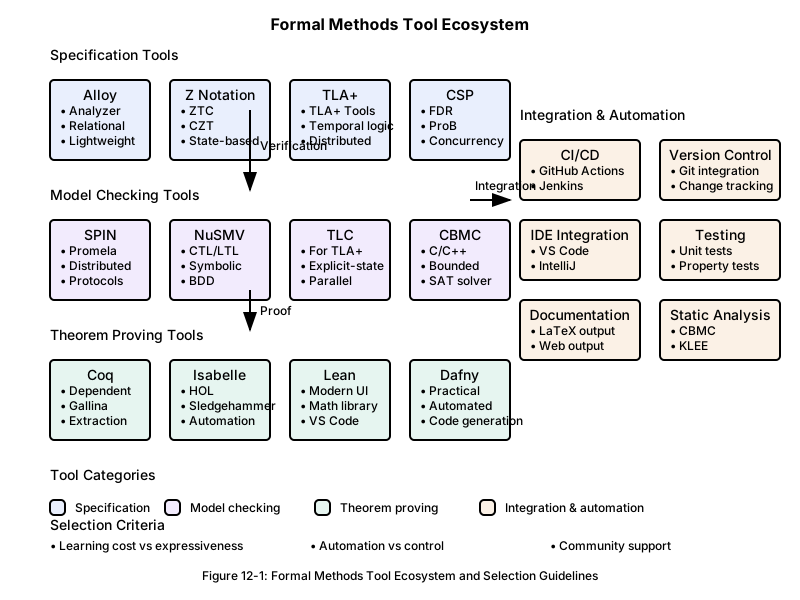
12.1 An Overview of the Tool Ecosystem
Why Tools Matter in Making a Technique Practical
The practical value of formal methods is determined not by theoretical elegance, but by how usable they are in real development settings. Even an excellent theory will not be adopted if the lack of appropriate tool support causes the learning cost and operational cost to exceed what a development team can realistically absorb.
Looking back at the history of software engineering, many technological advances became practical only after good tools emerged. Compilers accelerated the spread of programming languages. Integrated development environments (IDEs) improved developer productivity. Version control systems made team development more efficient. Formal methods follow the same pattern: the maturity of tools is one of the main determinants of whether the methods will spread.
Toolchain Design Principles
Using formal methods effectively requires not a single standalone tool, but a coordinated toolchain. That toolchain needs to integrate the following capabilities.
Support for writing specifications: Editors, syntax checking, and completion features that help developers write formal specifications efficiently. These functions reduce cognitive load and prevent authoring mistakes.
Executing verification: Capabilities for running model checking, theorem proving, and constraint solving against the written specifications. These functions confirm the consistency and feasibility of the specification.
Interpreting results: Visualization and explanation support for verification results, counterexamples, and proofs. Complex verification outcomes need to be presented in a form that humans can understand and act on.
Integration with existing workflows: Connections to existing development tools such as IDEs, build systems, and version control. A formal-methods tool should not remain isolated from the workflow; it needs to fit naturally into day-to-day development.
Strategic Perspectives on Tool Selection
Choosing a tool is not just a technical decision. It requires a combined assessment of organizational capability, project constraints, and long-term strategy.
Managing the learning curve: Balance the team’s current skill level against the time and resources available for learning a new tool. A steep learning curve is often the first barrier to adoption.
Assessing ecosystem health: Evaluate the tool’s development model, the activity level of its community, and its long-term sustainability. Even a technically strong tool becomes risky if maintenance stops.
Considering scalability: A tool that works well in a small experiment may have performance or usability problems at actual project scale. It is important to validate that risk in advance.
Avoiding vendor lock-in: Excessive dependence on a specific vendor or tool narrows future options. When possible, choose tools that use standard input and output formats.
A Staged Tool Adoption Strategy
Tool introduction needs to proceed in stages, in parallel with the team’s technical growth. Trying to introduce every tool at once often creates confusion and increases the probability of failure.
Stage 1: Learning support tools
Start with educational tools that help the team learn the concepts of formal methods. Tools with strong visual feedback, such as Alloy Analyzer, are especially useful at this stage.
Stage 2: Lightweight verification tools
Introduce lightweight tools that let the team experience practical value quickly. Tools that are easy to set up and provide immediate feedback are preferable.
Stage 3: Integrated development tools
Adopt tools that can be integrated into the existing development environment and used as part of everyday engineering work.
Stage 4: Advanced specialized tools
Introduce high-capability tools for handling more complex problems. These are typically led by team members with deeper expertise.
Evaluating the ROI of Tool Investments
Investment in tools should be judged in terms of business value, not just technical curiosity.
Direct effects: Quantifiable gains such as shorter development time, earlier bug detection, and reduced testing effort.
Indirect effects: Long-term value such as better design quality, accumulation of reusable knowledge, and improvement in team capability.
Opportunity cost: Compare the outcome of investing in tool adoption with the outcome of investing the same resources in other improvement efforts.
Risk reduction: Estimate the value of avoiding potential risks such as severe defects, costly redesign, or lower customer satisfaction.
It is important to evaluate tool investment from all of these perspectives and align the decision with the organization’s strategic goals.
12.2 Choosing and Using Specification Tools
Categories of Specification Tools and Their Characteristics
Specification tools can be categorized by their expressiveness, their target systems, and their learning cost. Choosing the right tool depends on the nature of the project and the ability of the development team.
Lightweight specification tools:
Tools such as Alloy and TLA+ have relatively low learning cost and allow teams to see value in a short period of time. They are suitable for prototyping and design validation. Their main strength is not exhaustive completeness but exploratory value: they help surface problems early in the design phase.
Heavyweight specification tools:
Tools such as the B-Method, Z notation, and VDM support comprehensive and rigorous specification. They are suitable for strictly specifying large systems, but they require more time to master and rely on specialist knowledge.
Domain-specific tools:
Tools such as SCADE for aerospace, SPARK for safety-critical software, and Dafny for program verification are specialized for particular domains. They can be highly productive in the domains they target, but their applicability is narrower.
Criteria for Selecting a Tool
It is important to establish a systematic evaluation framework for selecting the tool that best fits a given project.
Evaluating expressiveness:
Assess whether the tool can adequately express the relevant system characteristics, such as state complexity, concurrency, real-time behavior, or distribution. If the expressiveness is insufficient, important properties may become impossible to describe, or the team may be forced into unnatural models.
Evaluating usability:
Look at how intuitive the syntax is, how understandable the error messages are, and how complete the debugging support is. These directly affect team productivity.
Evaluating tool maturity:
Consider the tool’s development history, community size, documentation quality, and support structure. Mature tools generally cause fewer practical problems and provide more resources for solving them.
Evaluating integration capability:
Assess how easily the tool integrates with the existing development environment, version control, and continuous integration systems. An isolated tool interrupts the development workflow.
Effective Usage Patterns
To use a specification tool effectively, it is important to understand practical patterns that make the most of its capabilities.
Exploratory specification:
At an early stage, when requirements are still ambiguous, it is often more effective to write quick prototype-level specifications and deepen understanding through validation than to aim immediately for a perfect specification.
Stepwise refinement:
Start with a high-level abstract specification and add detail in stages. Run validation at each stage so that problems can be detected early.
Modeling from multiple viewpoints:
Model the same system from different perspectives—such as structure, behavior, performance, and security—and then check consistency across those views. A multifaceted approach is often essential for understanding complex systems.
Iterative improvement:
Use the results of validation to improve the specification continuously. In practice, it is usually more effective to start from an improvable specification than to insist on perfection at the first attempt.
Using Specification Tools in Team Development
A tool that works well for an individual does not automatically work well for a team. Team development introduces additional challenges.
Ensuring shareability:
Standardize notation, naming rules, and module structure so that multiple team members can understand and maintain the same specifications.
Supporting distributed work:
Establish policies for partitioning large specifications and procedures for merging work when multiple people develop specifications in parallel. Managing dependencies and preserving consistency are essential.
Sharing knowledge:
Build a structure for capturing and sharing tool usage methods, best practices, and solutions to common problems at the organizational level.
Managing quality:
Establish a process for continuously assessing and improving specification quality, including completeness, consistency, and maintainability.
Typical Problems During Introduction and How to Address Them
Real deployments often encounter unexpected issues, so it is important to prepare mitigations in advance.
Underestimating the learning cost:
A tool may look easy in a vendor demo, but mastering it in practice often takes much longer than expected. Adoption therefore needs a realistic learning plan and a staged capability-building strategy.
Scalability problems:
A tool may work well on a small example but show performance or usability problems on a real project. Pre-adoption scalability testing and fallback options are important.
Conflict with the existing toolchain:
A new tool may interfere with existing development tools and produce unexpected failures. A staged rollout and a rollback plan are necessary.
Mismanaging expectations:
Overestimating what a tool can do creates disappointment and can lead to abandonment. Adoption needs realistic goals and incremental results.
Recognizing these problems in advance and preparing appropriate responses can substantially increase the probability of successful adoption.
12.3 Effective Use of Verification Tools
Categories of Verification Tools and Their Areas of Applicability
Verification tools have distinct characteristics and suitable use cases depending on the technique they apply and the target they verify. Choosing the right tool depends on the properties to be verified and on the system being developed.
Model checking tools:
Tools such as SPIN, NuSMV, TLA+/TLC, and Java PathFinder are strong at exhaustive verification of finite-state systems and are well suited to concurrent systems and protocols. State explosion limits their usefulness on very large systems, but they remain highly effective for thoroughly checking critical subsystems.
Theorem provers:
Tools such as Coq, Isabelle/HOL, Lean, and Agda provide the highest level of confidence through mathematically rigorous proof. They also require advanced expertise and a significant engineering investment. They are appropriate for the core of safety-critical systems and for proving the correctness of cryptographic algorithms.
Program verification tools:
Tools such as Dafny, SPARK, Frama-C, CBMC, VeriFast, and Krakatoa provide direct verification for actual program code. They are relatively easy to integrate into the development workflow and have high practical value, but the range of properties they can express is limited.
Constraint solving and SMT solvers:
Tools such as Z3, CVC4, Yices, and MathSAT often operate as backends for other verification tools. Teams usually benefit from them indirectly rather than using them directly.
Planning a Verification Strategy
Effective verification requires a strategic approach that accounts for system characteristics and development constraints.
Hierarchical verification strategy:
Decompose the system into multiple levels of abstraction and apply the most suitable verification method at each level. For example, use model checking at the architecture level, program verification at the module level, and theorem proving at the algorithm level.
Risk-based verification:
Instead of applying the same depth of verification to every part of the system, adjust the verification effort according to risk and importance. Parts directly tied to safety deserve rigorous verification, while lower-risk parts can be covered with lighter-weight methods.
Complementary verification:
Combine multiple verification techniques so that the weakness of one approach is compensated for by the strength of another. For example, use theorem proving for properties that are hard to cover with model checking, and use model checking where exhaustive exploration is more practical.
Optimizing the Verification Process
Verification work becomes more efficient when the process itself is deliberately designed.
Increasing complexity in stages:
Start from the simplest case and gradually increase complexity. This approach helps uncover and correct fundamental issues early, making later investigation of more complex properties more efficient.
Counterexample-driven improvement:
Treat counterexamples found during verification as valuable diagnostic information rather than just error reports. Analyze them carefully and use the results to improve the system or the specification.
Reusing proofs:
Build a structure in which proofs and verification models can be reused across similar problems. Proof libraries and model templates can substantially improve efficiency.
Using automation:
Automate repetitive verification work. When verification is integrated into continuous integration, every code change can trigger verification automatically.
Interpreting and Using Verification Results
The output of a verification tool only becomes valuable when it is interpreted correctly and connected to actual improvement.
Systematic analysis of counterexamples:
When model checking finds a counterexample, analyze it in terms of root cause rather than just the surface symptom. Follow the trace in detail to understand the essence of the problem.
Diagnosing proof failures:
When theorem proving does not complete, determine whether the difficulty comes from the theorem being false or from an ineffective proof strategy, and then choose the appropriate response.
Recognizing verification limits:
Understand the limits of each verification method and assess the risk of what has not been verified. Completing a verification task does not automatically guarantee overall quality.
Prioritizing improvement actions:
Evaluate the significance of the problems that verification finds together with the cost of correcting them. Different issues require different priorities.
Continuously Improving Verification Quality
Verification processes themselves need a mechanism for continuous improvement.
Measuring verification coverage:
Measure which parts of the specification or implementation are actually covered by verification. Use that information to identify gaps and plan further verification.
Analyzing false positives and false negatives:
Examine both the issues that tools report incorrectly and the issues they fail to report. Use that analysis to improve tool configuration and verification strategy.
Measuring verification efficiency:
Assess verification efficiency by comparing the time spent on verification with the significance of the problems discovered. This helps identify low-value verification work and refine the method or tool.
Improving team capability:
Create a structure for sharing the knowledge and skill that accumulate through verification work so that the team’s overall verification capability keeps improving.
These efforts allow verification to evolve from a one-time activity into an organizational capability that improves continuously over time.
12.4 Code Generation and Implementation Support
The Possibilities and Limits of Generating Code from Formal Specifications
Automatically generating code from formal specifications is one of the most appealing applications of formal methods, but it is important to understand both its possibilities and its limits accurately.
Where fully automatic generation fits:
High-quality code generation is possible in areas where the relevant mathematical properties are clearly defined and the implementation options are constrained. Examples include protocol stacks, state machines, data transformation logic, and constraint checking. In these areas, the abstraction level of the specification is relatively close to the abstraction level of the implementation, which makes mechanical transformation feasible.
The value of partial assistance:
Even when complete code generation is unrealistic, there is still substantial value in partial assistance such as generating code skeletons, interface definitions, or test cases. These forms of assistance help prevent omissions and inconsistencies during implementation.
Quality constraints on generated code:
Automatically generated code usually prioritizes correctness over readability and maintainability. Performance optimization and platform-specific adaptation are also limited. Teams therefore need to decide whether generated code should be used as-is or refined manually.
Using Formal Specifications as Implementation Guidance
Even where code generation is difficult, formal specifications still provide strong guidance for implementation.
Practicing contract-based programming:
Express preconditions, postconditions, and invariants from the formal specification using the target language’s contract mechanisms, such as assertions or annotations. Runtime checking then helps verify implementation correctness continuously.
Using the type system:
Reflect the data types and constraints defined in the specification in the implementation language’s type system. Many implementation errors can then be prevented at compile time. Languages with algebraic data types and generics are especially well suited to carrying over the structure of the specification.
Supporting test-driven implementation:
Use test cases derived from the formal specification to support test-driven development. Because the specification is systematic, this approach often achieves higher test coverage than ordinary ad hoc TDD.
Making refactoring safer:
Use the formal specification to verify that functionality is preserved before and after refactoring. That provides a stronger basis for large code changes.
Choosing and Using Code Generation Tools
Practical code generation depends on choosing suitable tools and configuring them appropriately.
Clarifying what to generate:
Do not try to generate the whole system automatically. Instead, identify the parts most suitable for generation and start with a narrowly focused scope, such as the data access layer, protocol handling, or validation logic.
Customizing templates:
Adjust the tool’s default templates so that they match project coding standards and performance requirements. This helps align generated code quality with team expectations.
Integrating generated and handwritten code:
Define a clear boundary between automatically generated code and manually implemented code, and design the integration method accordingly. Updates to generated code should not destabilize handwritten code.
Integrating with version control:
Establish a policy for managing generated code in version control so that teams can track changes and analyze the impact when specification updates regenerate code.
Integrating with Quality Assurance Processes
Quality assurance for generated code requires an approach that differs from ordinary manual implementation.
Verifying the generation process:
Validate the correctness of the code generator itself. That includes checking generation rules, template validity, and the soundness of transformation algorithms.
Inspecting generated code:
Apply static analysis, dynamic testing, and performance measurement to automatically generated code to confirm that it satisfies the required quality level.
Ensuring traceability:
Make it possible to trace each element of the specification to the part of the generated code it affects. This makes it easier to analyze failures and to determine the impact of requirement changes.
Automating regression tests:
When specification changes regenerate code, automatically rerun regression tests so that the effect of those changes can be validated quickly and quality can be preserved continuously.
The Stepwise Evolution of Implementation Support
Capabilities for code generation and implementation support are most realistic when developed in stages.
Stage 1: Skeleton generation
Generate the structural parts of the implementation, such as class definitions, interface definitions, and method signatures. This helps preserve consistency and completeness.
Stage 2: Constraint-check generation
Automatically generate checks for preconditions, postconditions, and invariants so that runtime validation can support implementation correctness.
Stage 3: Business-logic generation
Automatically generate implementation for regular patterns such as CRUD operations, data transformation, and state transitions. This can significantly improve development efficiency.
Stage 4: Optimized code generation
Generate optimized code that accounts for performance requirements and platform characteristics. In advanced cases, this can exceed the quality of manual implementation.
Success Factors and Cautions in Adoption
It is important to understand both the factors that support successful adoption and the pitfalls that need to be managed.
Setting realistic expectations:
Expecting code generation to eliminate programming entirely leads to disappointment and abandonment. Teams need concrete goals centered on productivity improvement and quality gains.
Introducing it in stages:
Instead of attempting full-system adoption at once, build confidence by succeeding in a limited area and then expanding the scope gradually.
Managing skill requirements:
Using code generation effectively requires both the ability to write formal specifications and the operational knowledge needed to maintain the generation tools. Training and capability development therefore need to be planned explicitly.
Considering maintainability:
Design with the maintainability of generated code in mind, including readability, ease of debugging, and extensibility. Quality standards should assume long-term operation.
If these factors are managed carefully, code generation and implementation support can become a powerful means of increasing the capability of a development team.
12.5 Integration with Continuous Integration
Positioning Formal Verification in CI/CD Pipelines
In modern software development, continuous integration (CI) and continuous deployment (CD) are foundational practices. If formal methods are to become practical, formal verification needs to be integrated into those automated workflows.
Verification as a quality gate:
In addition to builds, unit tests, and integration tests, formal verification can be inserted as a quality gate. If a code change breaks consistency with the formal specification, the pipeline can fail automatically and expose the problem early.
Implementing staged verification:
Not every verification task should run in the same pipeline phase. Practical operations separate verification according to importance and execution cost. Lightweight checks can run on every commit, while heavier checks can run nightly or weekly.
Speeding up with parallelism:
Independent verification tasks can be executed in parallel to reduce pipeline time. This helps keep verification from disrupting the rhythm of development.
Operational Design Lines for Integrating Theorem Proving (Lean and Similar Tools) into CI
Theorem proving delivers a high level of assurance, but runtime, dependency management, and the maintenance cost of proof assets can easily dominate the operational burden. In CI, it is therefore better not to assume full proof re-execution on every pull request. Instead, verification levels should be separated operationally.
- Pull requests (minimum level): smoke tests for syntax and builds, detection of incomplete markers such as
sorry, and checking the scope of the change - Nightly or scheduled runs (deep verification): rerun representative theorem sets, detect the impact of dependency-library updates, and execute heavier proofs
- Before release (stabilization): pin the toolchain and dependencies, confirm reproducibility, and preserve logs for audit purposes
Operationally, the following points matter.
- Pin dependencies: Fix versions of the
elantoolchain,Lakepackages,mathlib4, and related dependencies so that CI remains reproducible. - Use caching: Cache toolchains and build artifacts to keep pull-request latency under control.
- Control changes carefully: Review requirement changes and proof changes in the same pull request so that proofs do not drift away from requirements even when they still pass. See the trust model in Chapter 9.
Identifying Verification Work That Can Be Automated
Not every part of formal verification is equally suitable for automation. It is important to identify the tasks where automation provides the highest return and integrate those first.
Syntax checks and consistency validation:
Syntax errors, type errors, and reference errors in formal specifications are straightforward to automate. They help catch obvious mistakes immediately.
Automatic model-checking execution:
Model checking for problems with finite state spaces can be fully automated. This allows continuous validation of important properties such as deadlock freedom, safety, and liveness.
Executing contract checks:
Automatically run checks for preconditions and postconditions embedded in programs. This helps detect divergence between the implementation and the specification at execution time.
Running regression verification:
Automatically confirm that existing proofs and verification models remain valid after changes to the specification or the implementation.
Visualizing and Reporting Verification Results
Verification results produced in CI/CD need to be presented in a form that the development team can understand and use efficiently.
Building dashboards:
Provide dashboards that give a quick overview of verification status, coverage, and performance indicators.
Generating detailed reports:
When problems are found, automatically generate detailed reports that include counterexample traces, proof failure locations, and suggested remediation directions.
Providing trend analysis:
Analyze the change in verification results over time so that quality trends—both improvements and regressions—become visible.
Implementing notifications:
Provide a notification mechanism that distinguishes between issues requiring immediate response and issues that can be handled later.
Managing Performance and Scalability
The largest challenge in integrating formal verification into CI/CD pipelines is usually the time and compute resources it consumes.
Optimizing verification time:
Use incremental verification to recheck only the parts affected by a change. This helps keep verification practical even for larger systems.
Using cloud resources:
Run compute-intensive verification tasks in cloud environments so that they can scale on demand and balance cost against execution time.
Implementing caching:
Cache verification results where appropriate so that identical work does not need to be repeated. This is particularly useful when several related projects can share parts of the verification outcome.
Setting timeouts:
Define time limits so that a single long-running verification task cannot block the entire pipeline. Timeout values should reflect the importance of the check.
Harmonizing with the Development Workflow
Integration of formal verification needs to respect the existing development workflow rather than disrupt it.
Aligning with the branching strategy:
Adjust verification depth according to the role of each branch, such as feature, development, and main, so that the organization can balance engineering speed with quality assurance.
Integrating with pull requests:
Include formal verification results in the pull-request review process so that human review and machine verification complement each other.
Defining deployment conditions:
Require key formal verification checks to pass before code can be deployed to production. This reduces the probability of promoting code that still contains severe defects.
Handling hotfixes:
Prepare simplified verification procedures for urgent fixes so that the organization can balance speed of response with quality assurance.
Coordinating with Operational Monitoring
If verification in CI/CD is connected to operational monitoring in production, teams can establish a more comprehensive quality-assurance loop.
Runtime contract checking:
Continue monitoring the contract conditions validated during development in the production environment so that specification violations can be detected early.
Monitoring performance specifications:
Continuously observe formally stated performance properties—such as response time, throughput, and resource usage—in the live environment so that degradations can be identified quickly.
Log-based verification:
Use system logs to verify whether important properties, such as security policies and business rules, continue to hold during operation.
Building a feedback loop:
Feed issues found in production back into the development process so that verification content can be improved based on real operational evidence.
Through integration with continuous integration, formal methods cease to be a one-off activity and instead become a continuous means of quality assurance embedded in the development process itself. That makes sustained delivery of high-quality software more realistic.
12.6 Successful Tool Adoption Patterns and How to Avoid Failure
Common Patterns in Successful Introductions
When tool introduction efforts for formal methods are compared across many organizations, successful projects show clear common patterns. Understanding those patterns materially improves the probability of success.
Starting from a concrete problem:
Successful adoption begins with a specific and pressing problem. The motivation is not “we want to try a new technology,” but rather a concrete business need such as improving quality, increasing development efficiency, or meeting regulatory requirements.
Starting with a small proof of value:
Instead of attempting large-scale adoption immediately, successful organizations start with a limited proof of value. Early success helps build trust inside the organization, and the scope can then be expanded step by step. This small-scale trial should validate not just technical feasibility, but also organizational acceptability.
Collaboration between experts and practitioners:
Success usually depends on a combination of outside specialists with deep technical knowledge and in-house practitioners who understand the realities of the organization. Experts alone tend to propose solutions that do not fit local constraints, while practitioners alone may not reach enough technical depth.
Continuing to invest in learning:
Tool adoption needs to be treated not as a one-time event, but as a continuous process of learning and improvement. That requires ongoing investment in education, training, and refinement rather than only an initial setup budget.
Typical Failure Patterns and How to Avoid Them
Many failures can be avoided if the organization understands common failure patterns in advance and prepares countermeasures.
Disappointment caused by excessive expectations:
Unrealistic expectations—such as believing that formal methods will solve every problem or make development dramatically easier—create a gap between expectation and reality, which often ends in abandonment.
How to avoid it: Set realistic goals before introduction, communicate both the benefits and the limits clearly, and build healthy expectations through small successes.
Neglecting organizational factors because of technical bias:
When teams focus only on the technical side and neglect organizational culture, existing processes, and talent development, the technical trial may succeed while the organization still fails to adopt it sustainably.
How to avoid it: Invest not only in technical adoption, but also in organizational change, process improvement, and culture building. Use change-management expertise where needed.
Delay caused by perfectionism:
Trying to establish a perfect tool environment or write a complete specification from the start often delays practical use until stakeholders lose interest.
How to avoid it: Use an agile approach—build something that works early, even if imperfect, and then improve it continuously.
Loss of continuity through isolation:
If formal methods are positioned as a special activity separate from the normal development process, they tend to lose sustainability.
How to avoid it: Integrate formal methods into existing development processes, toolchains, and evaluation systems so that they become a natural activity rather than a special exception.
Adoption Strategies Tailored to Organizational Capability
Adoption strategy should be adjusted to the organization’s current capability and culture.
Adoption in technically strong organizations:
Organizations with strong technical capability often care deeply about technical detail, but may care less about practicality or ROI. In those settings, it is important to preserve technical depth while making business value explicit.
Adoption in quality-focused organizations:
Organizations that already value quality are often able to understand the value of formal methods more readily. Connecting formal methods to existing quality initiatives can be particularly effective.
Adoption in efficiency-focused organizations:
Organizations that prioritize speed and efficiency often resist learning cost and the temporary productivity dip that comes with adoption. In such cases, it is effective to begin with lightweight methods that can show short-term benefit.
Adoption in safety-focused organizations:
Organizations working on safety-critical systems are among the easiest settings in which to justify formal methods. Adoption should connect directly to regulatory requirements and compliance goals.
Long-Term Strategy for Sustaining and Evolving the Practice
Successful adoption depends not only on initial rollout, but also on long-term sustainment and growth.
Accumulating knowledge inside the organization:
Gradually reduce dependence on external experts and build internal expertise. The goal is not dependence on a few individuals, but institutional capability.
Evaluating tools continuously:
Review the benefits and problems of the adopted tools on a regular basis, and consider migration or extension when better options emerge. Continuous improvement needs to track the evolution of technology.
Connecting with the community:
Maintain links with external formal-methods communities to keep collecting current practices, case studies, and technical developments. An isolated effort tends to stagnate.
Passing knowledge to the next generation:
Create structures for transferring formal-methods knowledge and experience to newer members so that staff movement or turnover does not erase organizational capability.
Continuously Measuring Return on Investment
The return on investment from tool adoption should be measured continuously and used to drive improvement.
Defining quantitative metrics:
Set measurable indicators such as defect discovery rate, development efficiency, testing effort, and post-release incident rate, and compare the before-and-after state.
Evaluating qualitative value:
Also establish a way to assess important but less easily quantified value, such as improved design quality, deeper shared understanding inside the team, and higher customer confidence.
Managing ongoing cost:
Track continuing costs such as tool licenses, education, training, and operational maintenance accurately, and compare them against the benefits obtained.
Executing improvement actions:
Use the measured results to expand the areas that are effective and to revise or reduce the areas that are not.
By understanding these success patterns and avoiding these failure modes, an organization can introduce formal-methods tools more successfully and convert that adoption into long-term competitive advantage.
End-of-Chapter Exercises
Use these exercises as design drills for tool selection, rollout planning, and workflow integration. They work for self-study, architecture workshops, or retrospectives on an existing engineering process.
Reading Check Exercise 1: Tool Selection Matrix
Choose the most suitable toolset for the following hypothetical project.
Project overview:
- Target: control software for a medical device
- Team size: 8 people, with 1 member experienced in formal methods
- Development period: 18 months
- Quality requirement: FDA approval is required
- Technical characteristics: real-time control and safety-critical behavior
Tasks:
- Select the most suitable tools for specification, verification, and implementation support
- Explain the rationale from the perspectives of technical requirements, organizational constraints, and risk assessment
- Create a staged tool adoption plan covering the full 18-month period
- Summarize the difficulties you expect and the countermeasures you would prepare
Suggested output
- a tool selection matrix with evaluation criteria and trade-offs
- a staged 18-month rollout outline
- a short risk note covering the main expected difficulties
Reading Check Exercise 2: Designing CI/CD Integration
Create a plan for integrating formal verification into an existing web application development project.
Current environment:
- Technology stack:
React + Node.js + PostgreSQL - Development method: agile with two-week sprints
- CI/CD tool:
GitHub Actions - Deployment:
AWS ECSfor production and staging - Team: 3 frontend engineers, 4 backend engineers, and 1 DevOps engineer
Integration tasks:
- Design a concrete method for integrating formal verification into the existing CI/CD pipeline
- Place lightweight and heavyweight verification at appropriate stages
- Design the workflow that should be followed when verification fails
- Propose a strategy for minimizing performance impact
- Assess the impact on the team and propose mitigation measures
Suggested output
- a pipeline-stage diagram or table
- a failure-handling workflow for verification results
- a short note on performance impact and team adoption
Practical Exercise 1: Code Generation Strategy
Design a strategy for generating code from formal specifications for the following system.
Target system: an online bookstore order-processing system
Main functions:
- Inventory management: add, subtract, and confirm stock
- Order processing: create, modify, and cancel orders
- Payment processing: authorize, settle, and refund payments
- Delivery management: prepare, ship, and track deliveries
Strategy design items:
- Classify which parts are suitable for fully automatic generation and which parts still require manual implementation
- Prioritize the generation targets and explain that prioritization
- Propose the tool choice and the template design policy
- Explain how generated code and handwritten code should be integrated
- Define the quality assurance process, including testing, review, and verification
- State the design principles needed to preserve maintainability
Suggested output
- a boundary table that separates generation targets from manual implementation
- a short architecture note on integrating generated and handwritten code
- a quality-assurance checklist for generated artifacts
Practical Exercise 2: Failure Analysis of a Tool Introduction
Analyze the following failure case and propose an improved approach.
Case: a failed attempt to introduce Alloy at an IT company
History:
- The company decided to introduce Alloy in a new product to improve quality
- An external consultant delivered an intensive three-day training course
- The team then started using Alloy in the real project
- Two months later, the initiative was abandoned because the learning cost was too high and the team doubted the practical value
Provided context:
- Team: 12 people, average 5 years of experience, no mathematical background
- Project: a six-month web-service development effort
- Existing process: agile development with strong emphasis on speed
- Motivation for adoption: differentiation from competitors and technical branding
Analysis tasks:
- Analyze the root causes of failure from technical, organizational, and process perspectives
- Identify the problems that arose at each stage: planning, introduction, execution, and evaluation
- Formulate an improvement plan that would make success more likely
- Propose alternative approaches, including different tools or a different adoption method
- Create a checklist for avoiding similar failures in the future
Suggested analysis outline
- identify the primary failure mechanism in each phase
- distinguish tool-choice problems from rollout-design problems
- propose a more realistic introduction strategy and fallback path
- summarize the checklist items you would reuse in future introductions
Advanced Exercise: Designing an Integrated Toolchain
Design a formal-methods toolchain for a large organization.
Organization profile:
- Industry: automotive, developing autonomous-driving systems
- Scale: 200 developers across multiple locations
- Technical domains: embedded systems, real-time control, and machine learning
- Quality requirements:
ISO 26262for functional safety and national autonomous-driving regulations - Existing tools:
MATLAB/Simulink,AUTOSAR,Git, andJenkins
Design requirements:
- Overall toolchain design:
- An integrated workflow from specification through implementation and verification
- Methods for integrating with the existing tool stack
- Mechanisms that support collaboration across multiple sites
- Staged rollout plan:
- A three-year introduction roadmap
- Goals and success indicators for each stage
- Risk-mitigation measures and fallback options
- Operating model:
- Role allocation between specialist teams and general developers
- An education and training program
- Integration with the quality-assurance process
- Technical detail:
- Data-exchange formats between tools
- Version control and traceability
- Measures for performance and scalability
- Economic evaluation:
- An investment plan covering initial investment and operating cost
- ROI calculation and business-case framing
- A method for continuous benefit measurement
Suggested output: a technical-lead proposal outline. If you want to work the exercise in a workplace-ready format, aim for roughly 30 to 40 pages or an equivalent architecture and rollout deck.
Self-review checklist:
- the workflow connects specification, implementation, and verification without hand-waving
- the rollout plan is staged and measurable
- governance, training, and tooling assumptions fit the organization profile
- economic justification is concrete enough for leadership review
Through these exercises, aim to build practical judgment and design skill for tools and automation, and to make formal methods usable in real projects rather than only in isolated demonstrations.